

Organization team roles
There are two organization-level roles.Administrator
Administrators have full access across the organization. They can:- Manage organization settings
- Add and manage team members
- Manage locations and programs
- Manage volunteers
- View Vulnerable Sector Check records across the organization
Program Coordinator
Program Coordinators can manage the day-to-day delivery of GrandPals across the organization. They can:- Manage locations and programs
- Manage volunteers
- View Vulnerable Sector Check records across the organization
- Support program setup and delivery
Before you begin
Have the following ready for each person you want to add:- First name
- Last name
- Email address
- The role they should receive
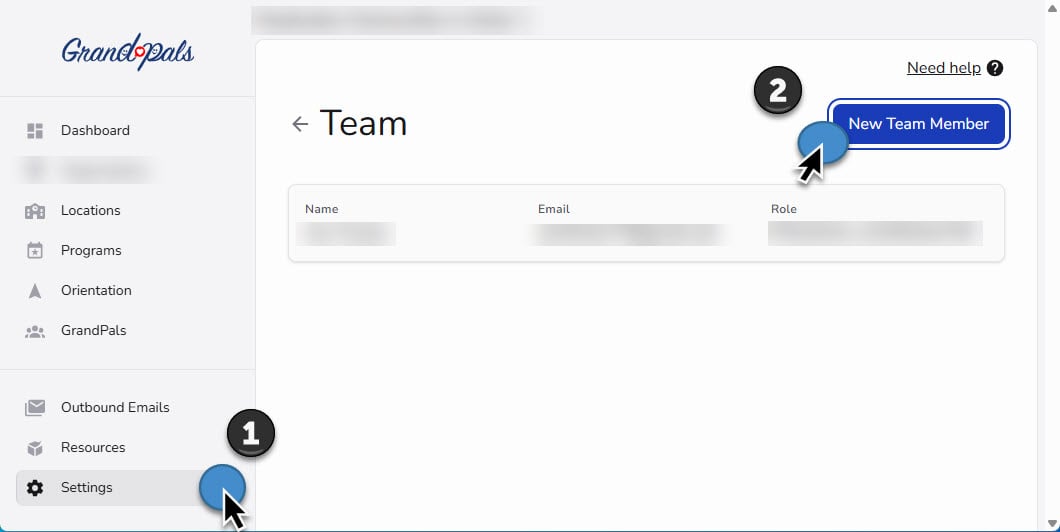
Add a team member
- Open Settings.
- Select Team.
- Select Manage your team.
- Select Add Team Member.
- Enter the person’s first name, last name, and email address.
- Choose Administrator or Program Coordinator.
- Select Save.
Choose the correct role
Choose Administrator when the person needs to:- Change Organization Settings
- Manage organization-level access
- Oversee the full organization account
- Coordinate volunteers
- Set up and manage programs
- Support schools, teachers, and GrandPals
- Review organization-wide VSC records
Review your existing team
Regularly review the Team page and confirm that:- At least one active Administrator is listed
- The lead Program Coordinator has access
- Additional coordinators have been added when needed
- Each person has the correct role
- Former staff members no longer have access
Other platform roles
Other people are added later in the area where they participate:
These roles do not need organization-wide access.
Vulnerable Sector Check access
VSC records contain sensitive information.- Administrators and Program Coordinators can view VSC records across the organization
- Principals and teachers can view VSC records only within their authorized location
- GrandPal Team Leaders and GrandPals cannot view VSC records
You are finished when
- Your organization has at least one active Administrator
- The lead Program Coordinator has access
- Any additional organization-wide team members have been added
- Everyone has the correct role
- Anyone who should no longer have access has been removed