

Before you begin
Have the following ready:- The letterhead logo you want to use on the VSC letter
- Your federal registration, charitable, or non-profit number, if applicable
- The name and position of the person responsible for Vulnerable Sector Checks
- The telephone number and email address that should appear on the letter
- Access to the person who will sign the letter
Set up your VSC letter
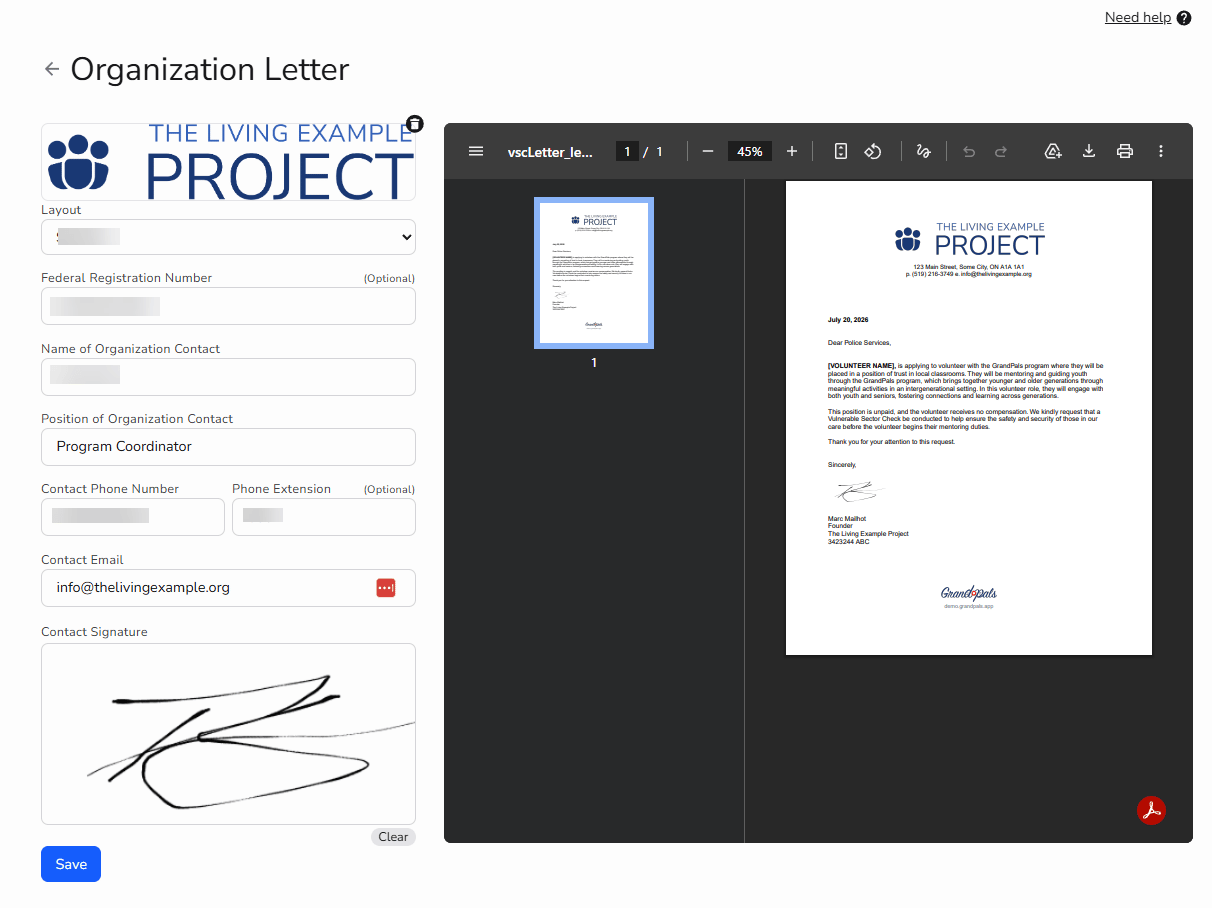
1. Select your letterhead logo
Choose the logo or letterhead image you want to appear on the VSC letter. Use a version that is appropriate for an official organization letter.2. Choose and preview the letter layout
Select either Side by Side or Stacked, depending on how you want the letterhead logo and contact information to appear. Select Save to apply the layout. The preview on the right side of the page will then update to show the selected format. If the layout does not display well, choose the other option and select Save again.3. Add your registration number
Enter your organization’s federal registration, charitable, or non-profit number, if applicable. Leave this field blank if it does not apply to your organization.4. Add the organization contact
Enter the full name of the person responsible for Vulnerable Sector Checks at your organization.5. Add their position
Enter the contact person’s job title or organizational role.6. Add the contact information
Enter the telephone number and email address that volunteers or police services should use if they have questions about the letter. Add a telephone extension if applicable.7. Add the signature
The organization contact signs directly in the Contact Signature box on this page. The signer should either:- Log in as a team member and add their signature, or
- Be present while an Administrator completes the page so they can sign directly in the box
8. Review the letter preview
After saving, use the preview on the right side of the page to check that:- The letterhead logo displays correctly
- The selected Side by Side or Stacked layout looks professional
- The registration number is accurate, if included
- The contact name and position are correct
- The telephone number and email address are current
- The signature displays clearly
- [VOLUNTEER NAME] appears in the correct location
9. Save your completed letter
After reviewing all of the information and the letter preview, select Save again to store your completed settings.How volunteers receive the letter
When a volunteer reaches the Vulnerable Sector Check stage of onboarding, the platform generates a personalized copy of the letter using the volunteer’s legal name. The volunteer can then use the letter as part of their Vulnerable Sector Check application.You are finished when
- The correct letterhead logo is selected
- The correct organization contact is listed
- The contact information is current
- The layout and signature display clearly
- The letter preview is ready to be issued to volunteers